

Internal Linking Strategy: How to Build Links That Rank
An internal linking strategy decides which pages link where and with what anchor text so authority reaches the pages you want to rank. Hub and spoke, audit.
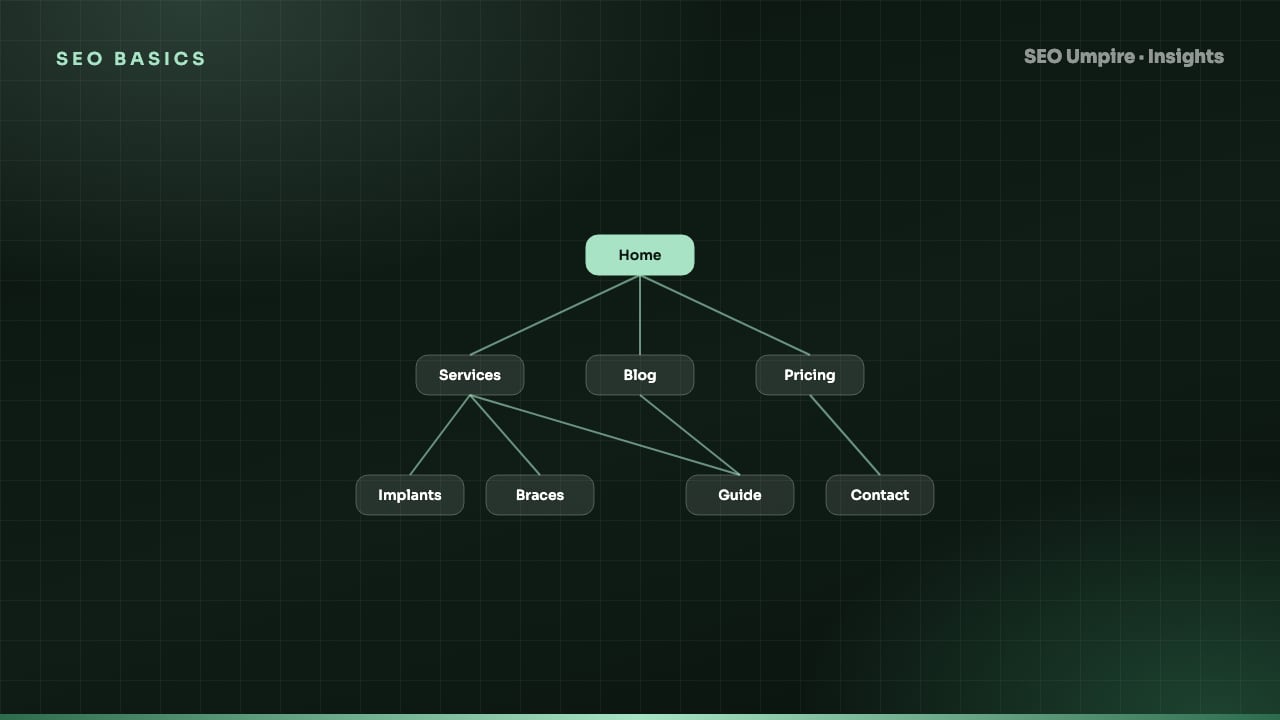
An internal linking strategy is a deliberate plan for which pages on your site link to which other pages, with what anchor text, so that crawlers discover every page, authority flows to the pages you want to rank and readers can move from one answer to the next. The most reliable model is hub and spoke: a pillar page for each topic links down to every supporting article, and every supporting article links back up to the pillar and sideways to a few siblings. Below is how to design it, the anchor text rules, the audit checks and the fixes.
Why do internal links matter so much for SEO?
Internal links do three jobs at once:
- Discovery. Googlebot finds new pages by following links. A page with no internal links (an orphan) relies on the sitemap alone and is crawled less often.
- Authority distribution. Link equity earned by backlinks to any page flows through internal links to the pages they point to. The pages with the most relevant internal links tend to rank best.
- Context. Anchor text and the surrounding sentence tell Google what the destination page is about. A hundred internal links saying "rank tracker" to one URL is a strong relevance signal.
They also keep readers on the site and move them toward conversion pages, which is why internal linking is one of the few SEO tasks that improves rankings, engagement and revenue at the same time.
What does a hub and spoke internal linking model look like?
Pick a topic you want to own, for example "technical SEO". Create one pillar page that covers the topic broadly and 6 to 15 supporting articles that each cover one subtopic in depth. Then link:
- Pillar to every spoke. The pillar has a section per subtopic with a link to the article that goes deeper.
- Every spoke back to the pillar. Usually in the intro or a "related" sentence, with the pillar's keyword as anchor.
- Spokes to 2 to 4 sibling spokes. Only where the content genuinely relates.
- Spokes and pillar to the relevant conversion page. For a SaaS, that is the tool or pricing page; for ecommerce, the category.
On this site, the technical SEO checklist acts as a pillar, with spokes such as the Core Web Vitals guide, the XML sitemap and robots.txt guide and the canonical tag guide, each linking back to the pillar and to the site audit tool as the conversion page.
Why clusters beat random linking
Random "related posts" widgets link by recency or category, not by meaning. Clusters create dense, topical link neighborhoods that search engines recognize as expertise on a subject, which supports experience, expertise, authority and trust signals. They also make cannibalization less likely because each subtopic has exactly one home.
How do I choose anchor text for internal links?
Anchor text rules, in priority order:
- Describe the destination, not the source. The anchor should tell a reader what they will get: "Core Web Vitals thresholds", not "click here" or "this article".
- Use the target keyword or a close variant most of the time. Unlike external links, exact-match internal anchors are safe; you control both ends. Mix in natural variants so the profile does not look mechanical: "rank tracking", "track your rankings", "a rank tracker".
- Keep anchors short. 2 to 6 words. Whole-sentence anchors dilute the signal.
- Link from meaningful sentences. The words around the link add context. "Pass the Core Web Vitals thresholds of 2.5s LCP and 200ms INP" is better than a bare list item.
- One link per destination per page. Google generally counts the first anchor; repeating the link adds nothing.
How do I build the strategy step by step?
- Crawl the site and export every URL with its inbound internal link count, click depth, status code and canonical. A site crawler gives you this table in one export.
- List your money pages (tools, products, services, pricing) and your target keywords for each.
- Group content into topic clusters and assign or create a pillar for each.
- Compare link counts to importance. Money pages and pillars should sit in the top quartile of inbound internal links. If a 2019 blog post has 80 links and your pricing page has 12, that is the first fix.
- Find orphans and deep pages. Any URL with zero inbound links or more than 3 clicks from the home page gets a link from a relevant, well-linked page.
- Add contextual links in existing content: for each new or under-linked page, search your own site for its keyword and add a link from each relevant mention. 5 to 10 new inbound links per priority page is a good first pass.
- Fix the targets. Every internal link should point to the final, canonical, 200 URL. Links to redirects lose a little equity and slow crawling; links to 404s lose all of it.
- Re-crawl and confirm the link counts moved. Watch the rank tracker over the next 4 to 8 weeks; internal link changes often show faster than content changes.
Which internal link placements carry the most weight?
| Placement | Relevance signal | Authority passed | Click-through | Use it for |
|---|---|---|---|---|
| In-body contextual link | Highest | High | Highest | Priority pages, cluster links |
| Breadcrumb | High (hierarchy) | Medium | Medium | Every inner page |
| Main navigation | Medium (site-wide) | Medium | High | Top categories and tools |
| Related posts block | Medium if topical, low if random | Medium | Medium | Cluster siblings |
| Footer | Low | Low | Low | Legal, contact, secondary pages |
| Sidebar widgets | Low | Low | Low | Avoid for SEO purposes |
Google discounts links that appear in the same boilerplate on every page. Body links are the lever.
What are the most common internal linking mistakes?
- Linking everything to the home page. The home page already has the most links. Push authority down to category and content pages instead.
- "Click here" and "read more" anchors. They waste the relevance signal.
- Orphaned new content. A new post published with zero links from existing pages waits for the sitemap crawl and starts with no authority. Add 3 to 5 inbound links at publish time.
- Links to redirected URLs after a migration. Update the hrefs, do not rely on the 301.
- Nofollow on internal links. There is almost never a reason; it stops equity flowing.
- JavaScript-only links. Buttons with click handlers and
<div onclick>are not links to a crawler. Use<a href>. - Over-linking. A paragraph where every third word is a link is unreadable and dilutes each link. Keep body links purposeful.
How does internal linking help AEO and GEO?
Answer engines and LLM crawlers follow links to understand which page on a site is the authoritative answer for a topic. A tightly linked cluster with a clear pillar gives them a single best URL to cite, which is exactly what you want. Our GEO guide explains how topical depth and clear structure influence citations. Pillars also make good entries for an llms.txt file, which lists the pages you most want AI systems to read.
How do I keep the strategy alive?
Internal linking decays as content grows. Set a quarterly task:
- Re-run the crawl and the link-count comparison.
- Add links from the quarter's new posts back into existing pillars and from pillars out to the new posts.
- Check for new orphans, deep pages and links to redirects.
- Review anchor text distribution for the top 10 money pages.
If you run WordPress, the SEO Umpire plugin suggests internal links while you write and flags orphans in the dashboard, which turns the quarterly chore into a habit. A free SEO check of any single URL also reports how many internal links point to it and how deep it sits, which is a fast way to sanity-check a page that is underperforming.
Frequently asked questions
How many internal links should a page have?
There is no fixed limit, but 3 to 8 contextual links in the body of a typical article is a practical range, plus navigation and footer links. The destination pages should be genuinely relevant; a link nobody would click adds nothing.
Do internal links help SEO as much as backlinks?
Backlinks bring authority into the site; internal links distribute it. A site with strong backlinks and poor internal linking wastes that authority on the wrong pages. Internal links are the lever you fully control, so their return on effort is usually higher.
Should internal links open in a new tab?
No. Internal links should open in the same tab so users keep normal back-button behavior. Reserve new tabs for external links where leaving the site would lose a form or a cart.
Do footer and sidebar links count?
They count, but less. Google treats site-wide boilerplate links as weaker signals than links inside the main content, and the same anchor repeated on every page carries little relevance information. Use contextual links in the body for the pages you want to push.
Free audit, 32 checks, prioritized fixes and a PDF report in about 15 seconds. No signup.
Keep reading
 SEO Basics
Competitor SEO Analysis: A 7-Step Process to Find Keyword Gaps
Competitor SEO analysis in 7 steps: find your real search competitors, run a keyword gap analysis, compare content, technical health, links and AI citations.
 SEO Basics
How Long Does SEO Take? Realistic Timelines by Site Type
How long does SEO take? Usually 3 to 6 months for measurable gains and 6 to 12 for competitive keywords. Timelines by site type and tactic, month by month.
 SEO Basics
Local SEO Guide: How to Rank in the Map Pack and Local Results
Local SEO explained: how Google ranks the map pack on relevance, distance and prominence, with steps for Business Profile, reviews, citations and schema.
One short email a week: what changed in Google and AI answers, and the fixes that matter. No spam, unsubscribe any time.