

Title Tag Length: The 600px Rule and Best Practices for 2026
The ideal title tag length is 50 to 60 characters, because Google truncates titles at about 600 pixels. Pixel rule, mobile differences and a writing formula.
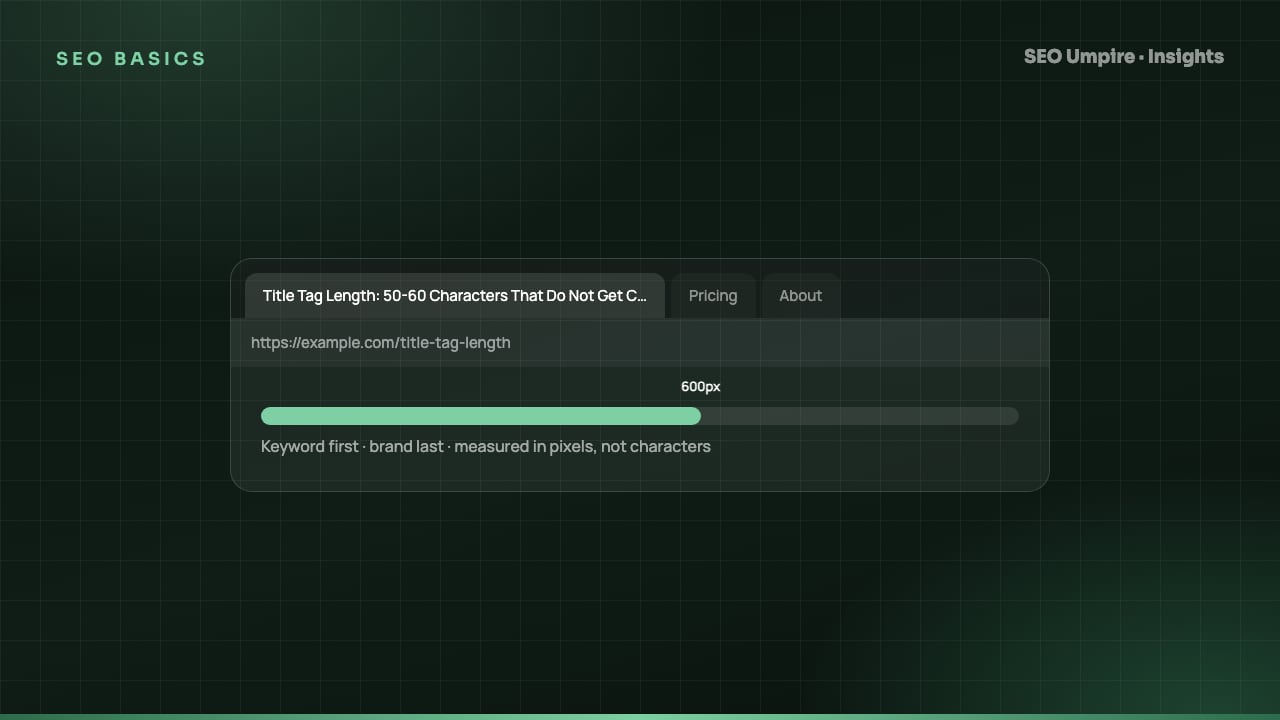
The ideal title tag length is about 50 to 60 characters. Google truncates titles that exceed roughly 600 pixels of display width on desktop, and most titles under 60 characters fit inside that limit. The constraint is pixels, not characters, so a title full of wide letters (W, M, capital letters) can be cut at 52 characters while a narrow one survives at 64. Keep the primary keyword in the first 30 characters, add one modifier, and end with a short brand suffix.
This guide explains the pixel rule, what happens on mobile, how Google rewrites titles, a formula for writing them, and how to audit a whole site.
What is a title tag?
The title tag is the <title> element in a page's <head>. It is the clickable headline in search results, the text in the browser tab, and the default title when the page is shared. It is one of the strongest on-page relevance signals because it is the page's one-line self-description. It is not the same as the H1, which is the visible heading on the page, although the two should agree.
<title>Title Tag Length: The 600px Rule and Best Practices | SEO Umpire</title>
How long should a title tag be?
The pixel rule
Google does not count characters. It renders the title in its results font and cuts it when it reaches the width of the title container, which is around 600 pixels on desktop. Anything beyond that is replaced with an ellipsis. Because letters vary in width, the same pixel limit lands at different character counts:
| Title composition | Approximate characters before truncation |
|---|---|
| Mostly lowercase, narrow letters (i, l, t, r) | 62 to 68 |
| Mixed-case normal sentence | 55 to 62 |
| Many capitals or wide letters (W, M, O) | 48 to 55 |
| ALL CAPS | 40 to 48 |
The 50 to 60 character guideline is the safe band across these cases. A dedicated pixel-width checker is more precise than counting characters, and a free SEO checker reports both for any URL.
Mobile and other surfaces
Mobile results wrap titles onto two lines and often show slightly more text than desktop, so a title that truncates on desktop may display fully on a phone. Do not count on it; desktop is the stricter case. Browser tabs show far fewer characters (often 20 to 30), which is a reason to front-load the keyword. Social networks use og:title, which you can set separately if the search title is too utilitarian for sharing.
Does title length affect rankings?
Length itself is not a ranking factor. A 90-character title is not penalized; it is truncated. The indirect effects are what matter:
- Truncated titles lose the brand or the modifier, which lowers click-through rate.
- Over-long titles are more likely to be rewritten by Google, and the rewrite may drop your keyword.
- Padding a title to 60 characters with filler words dilutes relevance. Shorter and precise beats longer and padded.
The full title is still read for relevance even when the display is cut, so a long but accurate title is better than a short, vague one. The best is accurate and under 60.
How does Google rewrite title tags?
Google replaces a title when it judges the original unhelpful. The published reasons include titles that are too long, stuffed with keywords, boilerplate repeated across pages ("Home", "Untitled", the same brand string on every page), missing entirely, or inconsistent with the page content. When it rewrites, it usually substitutes the H1, a prominent heading, or anchor text from internal links.
To minimize rewrites:
- Keep every title unique across the site.
- Make the title and H1 agree in meaning.
- Stay under about 60 characters.
- Use one keyword, not three variants of it.
- Avoid repeating the brand twice (a common plugin default on homepages).
If Google still rewrites a title you consider good, check the Search Console Performance report for the query; sometimes the rewrite outperforms the original and should be adopted.
How to write a title tag: a formula
Primary keyword + modifier or benefit + separator + brand
Examples:
Title Tag Length: The 600px Rule and Best Practices | SEO Umpire(63 characters, borderline; narrow letters make it fit)Free SEO Checker: Test Any URL in 60 Seconds | SEO Umpire(56)Keyword Research by Country: Find Local Search Volume | SEO Umpire(65, too long; drop the brand or shorten the modifier)
Rules that hold up:
- Keyword in the first 30 characters. Users scan left to right and tabs truncate early.
- One modifier that signals intent: guide, checklist, 2026, free, vs, for beginners, pricing. Choose the one the query implies.
- Separator: a pipe or a hyphen. Both are fine; be consistent sitewide. Do not use long dashes, which render wider and look odd in some fonts.
- Brand last, short. If the brand name is long, abbreviate or drop it on deep pages.
- Numbers and brackets raise click-through on list and comparison pages: "7 Steps", "(2026)", "[Checklist]".
- No ALL CAPS, no repeated keywords, no clickbait that the page does not deliver.
The AI meta tool drafts titles to this formula from the page content and shows the pixel width of each. It pairs with the meta description guide, because the two are read together in the results.
Title tag patterns by page type
| Page type | Pattern | Example |
|---|---|---|
| Homepage | Brand + what you do | SEO Umpire: Free SEO Checker and AI SEO Tools |
| Service or product | Keyword + key benefit + brand | `Rank Tracker: Daily Positions by Country |
| Blog or guide | Keyword + format + brand | `Core Web Vitals Guide: LCP, INP, CLS Fixes |
| Category or collection | Keyword + range or count + brand | `WordPress SEO Plugins: 9 Compared (2026) |
| Local page | Service + location + brand | `Local SEO Services in Dubai |
| Comparison | X vs Y + outcome + brand | `SEO vs AEO vs GEO: Differences Explained |
How to audit title tags across a site
- Crawl the site with a site audit and export URL, title, title length, title pixel width and H1.
- Filter for failures: missing titles, duplicates, over 65 characters or 600 pixels, under 25 characters, titles equal to the brand alone.
- Group by template. Product, category, article and tag archives usually share a pattern; fixing the pattern fixes every page.
- Rewrite the pattern in the CMS or SEO plugin so it fits the formula, using variables for the page name and a fixed brand suffix.
- Handle outliers by hand: the 20 to 50 pages that drive most traffic deserve individually written titles.
- Recrawl and compare. Then watch click-through rate per page in Search Console for four weeks. Title changes show in results within days of recrawl.
On WordPress, the SEO Umpire plugin lists every title over the limit and lets the Umpire Agent apply the pattern sitewide. Pair the audit with the on-page SEO checklist so headings and descriptions are fixed in the same pass.
Common title tag mistakes
- Using the same title on every page (a theme default)
- Leading with the brand on every page, pushing the keyword into the truncated zone
- Stuffing three keyword variants into one title
- Writing a title that does not match the H1 or the content, which triggers rewrites
- Letting the CMS append the site tagline so every title runs to 80 characters
- Ignoring pixel width and trusting a character count
Frequently asked questions
How long should a title tag be?
Aim for 50 to 60 characters. Google displays about 600 pixels of title on desktop, and most titles in that range fit without truncation. Wide characters like W and M use more pixels than narrow ones like i and l.
Does Google penalize long title tags?
No. A long title is not a penalty; it is simply cut off in the results with an ellipsis, and Google may rewrite it. The full title still counts for relevance.
Should I put my brand name in the title tag?
Yes, at the end, unless the brand is the search target. For a homepage put the brand first. For every other page lead with the keyword and finish with a short brand suffix.
Why does Google change my title tag?
Google rewrites titles it considers too long, keyword-stuffed, boilerplate, missing or mismatched with the page. It often substitutes the H1 or anchor text. Making the title accurate, unique and under 60 characters reduces rewrites.
Is the title tag the same as the H1?
No. The title tag appears in the browser tab and search results; the H1 is the visible heading on the page. They should match in meaning but do not have to be identical.
Free audit, 32 checks, prioritized fixes and a PDF report in about 15 seconds. No signup.
Keep reading
 SEO Basics
Competitor SEO Analysis: A 7-Step Process to Find Keyword Gaps
Competitor SEO analysis in 7 steps: find your real search competitors, run a keyword gap analysis, compare content, technical health, links and AI citations.
 SEO Basics
How Long Does SEO Take? Realistic Timelines by Site Type
How long does SEO take? Usually 3 to 6 months for measurable gains and 6 to 12 for competitive keywords. Timelines by site type and tactic, month by month.
 SEO Basics
Local SEO Guide: How to Rank in the Map Pack and Local Results
Local SEO explained: how Google ranks the map pack on relevance, distance and prominence, with steps for Business Profile, reviews, citations and schema.
One short email a week: what changed in Google and AI answers, and the fixes that matter. No spam, unsubscribe any time.