

What Is an SEO Audit? Definition, Checklist and Process
An SEO audit is a structured review of a site's crawlability, indexing, speed, on-page signals and content to find what blocks rankings. The 7-step process.
An SEO audit is a systematic review of a website that identifies everything preventing it from being crawled, indexed, understood and ranked by search engines. It checks technical health (crawlability, speed, mobile rendering, structured data), on-page signals (titles, headings, internal links, content quality) and, in a full audit, off-page factors such as backlinks and competitor positioning. The output is not a score but a prioritized list of fixes, ordered by how much ranking and traffic each one is likely to recover.
That last point is the one most people miss. A site can show a 92 out of 100 on a dashboard and still be invisible in Google because a single noindex tag is sitting on the template. The job of an audit is to find that kind of problem first.
Why does an SEO audit matter?
Search engines never tell you why a page is not ranking. Google Search Console shows symptoms (impressions dropping, pages "crawled, currently not indexed") but rarely the cause. An audit connects symptoms to causes by checking every layer a search engine passes through before it can rank you.
There are three moments when an audit pays for itself fastest:
- Before a redesign or migration. Most catastrophic traffic losses happen when URLs change, redirects are missed or a staging
robots.txtgoes live. - After an unexplained drop. If rankings fall 30 percent in a week, something changed: on your site, in a plugin, in Google's systems or at a competitor. The audit narrows it down.
- Before investing in content or links. Publishing 50 articles onto a site that cannot be crawled efficiently wastes the budget.
What does an SEO audit check?
A complete audit works through five layers in a fixed order, because each layer depends on the one before it. There is no point optimizing a title tag on a page Google cannot reach.
1. Crawlability
Can a search engine bot reach every page you want ranked?
robots.txtrules that block CSS, JavaScript, images or whole directories- Pages only reachable through JavaScript interactions, forms or search boxes
- Orphan pages with zero internal links pointing at them
- Crawl depth: important pages more than three clicks from the homepage
- Server errors (5xx), broken links (404) and redirect chains longer than one hop
- XML sitemap accuracy: does it list live, indexable, canonical URLs only?
2. Indexing
Is the right version of every page in the index, and nothing else?
- Stray
noindexdirectives in meta tags orX-Robots-Tagheaders - Canonical tags pointing to the wrong URL, or self-referencing canonicals missing on paginated and parameterized pages
- Duplicate content from
httpvshttps, trailing slashes, uppercase paths or tracking parameters - Thin or auto-generated pages (tag archives, empty categories, internal search results) diluting the index
- Hreflang errors on multilingual sites
3. Technical performance
Does the page render fast and stably on a mid-range phone?
Google's Core Web Vitals set the public thresholds: Largest Contentful Paint under 2.5 seconds, Interaction to Next Paint under 200 milliseconds, Cumulative Layout Shift under 0.1. An audit measures all three with field data where available (Chrome UX Report) and lab data where not. It also checks HTTPS, mixed content, mobile viewport configuration, image compression and formats, render-blocking scripts, and whether the HTML delivered to the bot contains the main content or only a loading shell. Read the Core Web Vitals guide for the fixes.
4. On-page signals
Does each page tell the engine clearly what it is about?
- One unique
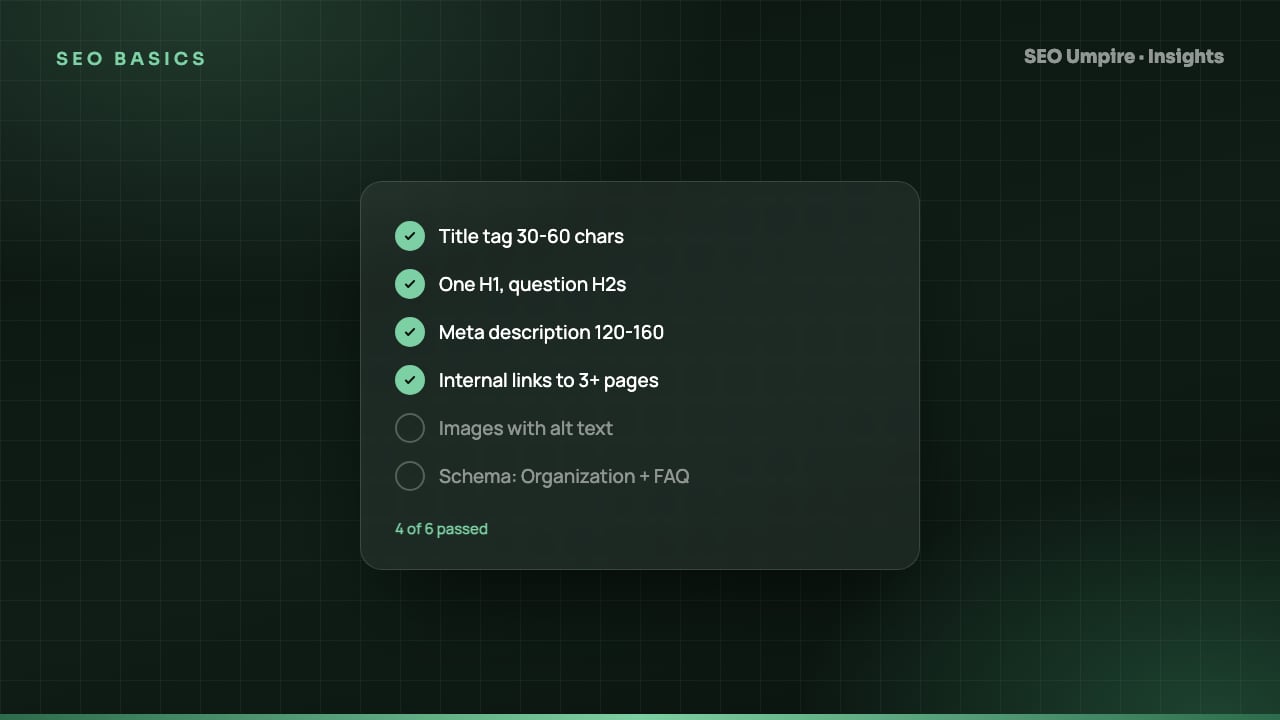
<title>per page, keyword near the front, within roughly 50 to 60 characters so it is not cut at Google's 600 pixel limit - A meta description that answers the query, 140 to 160 characters
- A single H1 that matches the title's intent, with H2 and H3 headings that structure the content
- Descriptive image
alttext - Internal links with meaningful anchor text pointing to the pages you most want to rank
- Structured data (JSON-LD) that validates and matches the visible content
The on-page SEO checklist covers each of these in depth.
5. Content and authority
This is the judgment layer. It asks whether the page deserves to rank, not just whether it can.
- Does the content match the search intent (informational, commercial, transactional, navigational)?
- Is it more complete, more current and more specific than the pages currently in positions 1 to 3?
- Are there keyword cannibalization problems where two of your pages compete for the same query?
- Does the site show experience, expertise, authority and trust signals: author bios, sources, contact information, editorial standards?
- How does the backlink profile compare with the competitors who outrank you?
How do you perform an SEO audit? Step by step
Here is the process a senior practitioner follows. The tools change; the sequence does not.
- Define the scope and baseline. List the pages or sections that matter commercially. Export current rankings, organic sessions and indexed-page counts so you can measure the effect of fixes later. A rank tracker gives you the before and after.
- Crawl the whole site. Run a full crawl with a desktop crawler or an online site audit tool. Export every URL with status code, canonical, indexability, title, meta description, H1, word count and inlink count.
- Compare the crawl with the index. Pull indexed URLs from Google Search Console (Pages report) and your XML sitemap. Three lists should match. Anything crawlable but not indexed, or indexed but not in the sitemap, is a finding.
- Measure performance. Check Core Web Vitals for the key templates: homepage, category, product or article, and contact. Field data first, lab data second.
- Review on-page elements by template. Fixing a template fixes thousands of pages at once; fixing one page fixes one page. Group findings by template, then by page.
- Assess content against the top three competitors. For each priority keyword, compare depth, freshness, format and intent match. Note gaps.
- Prioritize and write the action plan. Score every finding on impact (traffic at risk or gain) and effort (developer hours). Fix high-impact, low-effort items first. Blocking issues such as a sitewide
noindexgo to the top regardless of effort.
A free SEO checker handles steps 2, 4 and 5 for a single URL in under a minute, which is a useful first look before committing to a full crawl.
Automated vs manual SEO audits
| Factor | Automated audit | Manual (expert) audit |
|---|---|---|
| Time | Minutes | 2 to 5 days for a mid-size site |
| Cost | Free to low monthly fee | Hundreds to thousands of dollars |
| Finds technical errors | Yes, exhaustively | Yes, using the same crawl data |
| Judges content quality and intent | Partially | Yes |
| Evaluates competitors | Only with extra tools | Yes |
| Prioritizes by business impact | Rules-based | Context-aware |
| Best for | Ongoing monitoring, small sites, first look | Migrations, traffic drops, enterprise sites |
The practical answer is both. Run the automated crawl continuously so regressions surface within days, and bring expert judgment in when the data does not explain what you see. SEO Umpire's audit layers an AI review of intent and content on top of the crawl, and its Umpire Agent can apply the template-level fixes directly on WordPress sites through the plugin.
What should an SEO audit report include?
A useful report fits on a few pages and leads with decisions, not data dumps:
- Executive summary: the three to five issues costing the most traffic, in plain language
- Prioritized action list: each item with impact, effort, owner and the exact pages or templates affected
- Evidence: screenshots, crawl exports and Search Console data as appendices, not as the body
- Baseline metrics: rankings, indexed pages, Core Web Vitals, organic sessions, so progress is measurable
Two mistakes undo most audits: treating the score as the goal, and auditing only the homepage when the problems live in templates.
Frequently asked questions
How long does an SEO audit take?
An automated audit of a site under 1,000 pages finishes in minutes. A manual, expert-led audit of a mid-size site typically takes 2 to 5 working days, and an enterprise site with hundreds of thousands of URLs can take several weeks.
How much does an SEO audit cost?
Automated audits are free or part of a subscription. Agency audits usually run from a few hundred dollars for a small site to several thousand for a large or ecommerce site, mostly reflecting the hours spent interpreting the crawl data.
What is the difference between an SEO audit and a site audit?
A site audit is the automated crawl that lists technical errors. An SEO audit includes that crawl plus the judgment layer: keyword targeting, content gaps, backlinks, competitors and a prioritized action plan.
How often should you do an SEO audit?
Run a full audit at least once a quarter, and a quick technical re-check after any redesign, domain migration, CMS or plugin update, or an unexplained traffic drop.
Can I do an SEO audit myself?
Yes. A free crawler plus Google Search Console covers crawl errors, indexing, Core Web Vitals, titles and meta descriptions. You only need outside help for large sites, migrations or when the data does not explain a ranking loss.
Free audit, 32 checks, prioritized fixes and a PDF report in about 15 seconds. No signup.
Keep reading
 SEO Basics
Competitor SEO Analysis: A 7-Step Process to Find Keyword Gaps
Competitor SEO analysis in 7 steps: find your real search competitors, run a keyword gap analysis, compare content, technical health, links and AI citations.
 SEO Basics
How Long Does SEO Take? Realistic Timelines by Site Type
How long does SEO take? Usually 3 to 6 months for measurable gains and 6 to 12 for competitive keywords. Timelines by site type and tactic, month by month.
 SEO Basics
Local SEO Guide: How to Rank in the Map Pack and Local Results
Local SEO explained: how Google ranks the map pack on relevance, distance and prominence, with steps for Business Profile, reviews, citations and schema.
One short email a week: what changed in Google and AI answers, and the fixes that matter. No spam, unsubscribe any time.